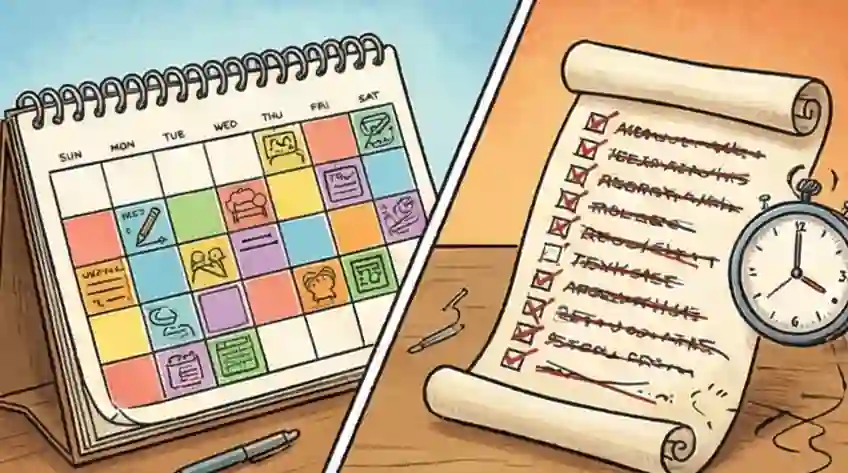
Productivity System Simple Choices
-
01
If interruptions happen often The To-Do List is best for you. It's easiest to manage when things change quickly because it keeps information simple and flexible.
-
02
If your schedule is mostly yours Time Blocking is needed first. It locks in your tasks, which stops you from wasting energy deciding what to work on next.
-
03
Why you choose one over the other Time Blocking focuses on knowing what you can actually do (saving time for deep work). To-Do Lists focus on seeing everything you have to do (making sure nothing is forgotten).
How to Make the Right Productivity Choice
Deciding between time blocking and a normal to-do list isn't about what looks better; it's about how you weigh your work data. This choice decides if you focus on "seeing everything" (the comfort of having a full list) or "being realistic about your time" (facing the truth that time is limited). When these don't match, your system becomes a problem that creates unnecessary work and hides the real value you bring.
Most people get stuck in the "Do Both Mistake," trying complex software or using many colors to feel busy. This just leads to "Busy Work Theater," where organizing your system becomes a fancy way to put off real work. Doing more paperwork about your work doesn't help you actually get the work done; it just means your system breaks faster when things get busy.
To fix this, you need to focus on one main thing: How often do you get interrupted? Your success isn't about how disciplined you are, but how well your planning system fits the actual number of times your day gets interrupted. By matching your method to how much control you actually have over your schedule, you stop guessing and start building a system that protects your work from chaos.
What Is Time Blocking vs. a To-Do List?
Time blocking assigns specific hours in your calendar to individual tasks, committing your future self to focused work before the day starts. A to-do list captures everything you need to do without pinning tasks to a time — giving you the flexibility to decide in the moment based on what is most urgent.
The real difference is not about which tool is smarter. It is about which one fits your reality. Research by Gloria Mark at UC Irvine found that it takes an average of 23 minutes to regain full focus after a single interruption. For workers whose days break apart every hour, a rigid calendar creates more problems than it solves. For those with protected schedules, a bare list leaves too much to chance.
Time Blocking Compared to To-Do Lists
| What's Important | Time Blocking | To-Do Lists |
|---|---|---|
| The Main Idea | Really understanding your available time | Always knowing everything you need to do |
| How Others See You | Shows you are in control of your time | Shows you can react quickly |
| Value for Tools | Good for calendar apps and deep work tools | Good for task managers and workflow tools |
| Biggest Problem | If one thing goes wrong, the whole plan falls apart | You get too many choices and never start |
| Bottom Line | Best when you control 80%+ of your schedule | Best when others control 80%+ of your schedule |
Why Time Blocking and To-Do Lists Are Different: Looking at How Often You Get Interrupted
In psychology, choosing between Time Blocking and To-Do Lists is mainly about how you react to how often your work environment changes. This "Interruption Rate" decides if your planning system helps you or just slows you down. To see why they feel so different, we need to look at how they handle the information you need to process.
Fixed vs. Flexible Information: How They Are Structured
Structure DetailsThe Mechanics
To-Do Lists use Flexible Information. Each item is simple, like a note. It's easy to add or remove things. This lowers the mental cost when things change. Time Blocking uses Fixed Information. By giving a task a specific time slot (like 2:00 PM – 3:00 PM), you attach it to the timeline. This is like putting data into a specific address in space and time.
The Reaction
If you don't get interrupted often, Fixed Information is better because it forces you to commit beforehand, saving you from making small choices all day. But if you get interrupted a lot, Fixed Information becomes a problem; one small break means you have to check and fix your whole rest of the day.
Mental Effort and the "Planning Stop"
Mental LoadThe Mechanics
When someone who is frequently interrupted tries to use Time Blocking, they hit the Planning Stop. Every incoming call or message means they have to re-plan everything left on their calendar, which wastes the mental energy they need for their actual work. According to Workamajig's 2023 workplace report, 98% of workers are interrupted at least 3-4 times per day — and the average worker is hit by a digital distraction every 11 minutes. A To-Do List handles interruptions better because it has a much lower Mental Cost to Re-check.
The Reaction
The list just stays there, giving you great Flexibility because you can see everything. Time blocking seems safe because you plan ahead, but it becomes Easily Broken when things don't go to plan.
What You Are Actually Asking For: Advice vs. Orders
Behavioral ChoiceThe Mechanics
Time Blocking is giving orders: You are telling your future self that you must focus on this now, assuming you have the Control Over Your Schedule to follow those orders. To-Do Lists are giving advice: They suggest things to do, letting your future self decide based on what is happening right then.
The Reaction
If you don't have control over your schedule, trying to give orders leads to feeling like a failure. This happens because the system doesn't match the reality of how often you get interrupted.
The Simple Choice: How You Weigh Your Work
When you pick a system, you tell your brain how important different things are: Time Blocking says time/depth is most important; To-Do Lists say knowing everything is most important. To choose right, check how much your day is interrupted. If 80% of your day is controlled by others, a To-Do List is the smart choice. If you control 80% of your day, Time Blocking stops you from putting off important things until later.
Looking Closer at Work Methods
Time Blocking: Making the Calendar the Boss
The Plan: You must treat your time like a limited physical resource by scheduling every task in your calendar. This makes you look like someone who is in charge and can do important, focused work that takes a long time, which looks good to hiring managers.
The Danger: If you guess wrong about how long things take or don't plan for human error, your whole day can fall apart instantly. One small delay causes a chain reaction, leaving you stuck with a schedule that isn't real anymore.
"A 40-hour time-blocked work week produces the same output as a 60+ hour week pursued without structure."
Best For: Managers or senior staff whose main job is deep thinking and producing high-quality work, and who have the power to tell people to stop contacting them for a few hours. For deep work sessions inside your blocks, the Pomodoro Technique gives each block its own internal rhythm.
To-Do Lists: The Always-Ready Responder
The Plan: This method keeps a full list of everything you need to do, so you always know what's going on. It's best for reacting quickly to changing needs, making you look good to bosses and automated systems that value being available right away.
The Danger: Without a time limit, you can get stuck choosing between tasks or waste time on easy, unimportant things while the truly important big project stays at the bottom of the list.
Best For: People in jobs where priorities change every hour and success depends on how fast you can switch gears and handle whatever comes your way.
What To Do Based on Your Situation
The Person Moving Up
GrowthWho they are: Doing well in a steady job, aiming for a management promotion soon.
The Person Changing Direction
ChangeWho they are: Trying to switch industries or careers, balancing their current job with learning new skills on the side.
The New Starter
New/Re-entryWho they are: New graduates or people coming back to work after a long break, needing to learn a lot of new things quickly.
The Final Test
Conclusion- IF your main goal is protecting time so you can get really good at something... THEN you should Time Block.
- IF your main goal is keeping track of everything and staying flexible... THEN you should use a To-Do List.
Using Cruit for Smarter Work
For Clear Direction Career Guidance Tool
Turns vague goals into a clear plan by asking the right questions to show you what you're missing.
For Proof Journaling Tool
Helps you remember your wins by keeping a smart, searchable record of your professional life, so recent events don't cloud your memory.
For Focus Job Application Tracker
Turns your application data into a simple chart to show you exactly where to put your effort for the best results.
Common Questions Answered
Can you still focus deeply with a to-do list?
Yes. Choosing a list when your day is frequently interrupted is smart self-management, not giving up on deep focus. Forcing a strict time block on a chaotic day creates clutter — you spend energy repairing a broken schedule instead of doing real work. If your job demands quick pivots, a to-do list lets you switch gears without guilt.
How do I stop my to-do list from getting out of control?
Set a daily limit of 3 priority tasks — the ones that must happen given the time you actually have free. If tasks carry over every day, the problem is not the list itself. It is a failure to admit that your time is genuinely limited. Admit the constraint, then cut the list accordingly.
Does time blocking make you less flexible at work?
Not if you treat it as a time budget, not a cage. When a high-value interruption arrives, you are not breaking the system — you are choosing to redirect your time budget. Because your schedule is visible, you can see what you are trading off, which turns a reactive snap decision into a deliberate one.
How many tasks should I time block per day?
Most time-blocking practitioners recommend 3 to 5 blocks per day, each lasting 60 to 120 minutes. Over-scheduling is the most common mistake — new users often cram 8 to 10 blocks in and leave no room for surprises. Build in at least one 30-minute buffer block in the morning and one in the afternoon.
Is time blocking better for creative work than a to-do list?
Generally yes, if you have schedule control. Creative work requires sustained concentration — the kind that takes 15 to 20 minutes just to reach after a distraction. A time block protects that ramp-up time. If clients or collaborators interrupt you frequently, pair a short protected block with a flexible list for everything else.
What should you do when a time block gets interrupted?
Accept the interruption, handle it, then return to the task — do not try to rebuild the entire schedule. The goal is to resume the block, not restart it from scratch. If the same interruption type breaks your blocks repeatedly, address the source: set a status, mute notifications, or communicate your availability window to your team.
Focus on what matters.
Your final choice between Time Blocking and To-Do Lists shows how much you understand your own work habits. Avoid the common mistake of building complicated systems that only make you look busy. Match your planning style to how often your day gets interrupted — that alignment is where your real productivity advantage comes from.
Start Using Cruit Now